

Claude Skills simplify complex workflows by automating tasks within MCP (Model Context Protocol) systems. They handle specific functions, adapt to workflow data, and enable smarter decision-making. MCP workflows orchestrate AI servers, tools, and processes, ensuring efficient operations. By integrating Claude Skills, you can:
- Automate error handling and recovery.
- Manage resources dynamically based on demand.
- Monitor performance proactively to prevent issues.
To get started, you’ll need tools like Claude.ai, Claude Code, the Claude API, Node.js, and MCP servers. Setting up involves enabling Skills, installing tools, configuring servers, and creating reusable skill templates. Once deployed, Claude Skills can process data, automate decisions, send notifications, and integrate with APIs.
Advanced features include triggers (event-based, scheduled, or state-dependent), linking multiple skills, and optimizing performance with batching, caching, and monitoring. Regular maintenance – like updating skills, checking logs, and cleaning up resources – ensures workflows stay efficient.
Automate Anything With Claude MCP Workflows, Here’s how:
Setup Requirements for Claude Skills Integration
Integrating Claude Skills involves setting up specific tools and configurations to ensure smooth automation and functionality.
Tools and Resources You’ll Need
To get started, you’ll need access to a paid Claude plan – such as Pro, Max, Team, or Enterprise – since free-tier accounts don’t support Skills. If you’re using Team or Enterprise plans, an administrator must enable Skills across the organization before individual users can access them.
Here’s what else you’ll need:
- Claude.ai: For managing skills via a web interface.
- Claude Code: The development hub for creating and managing skills.
- Claude API: Required for integration, along with access to the
/v1/skillsendpoint and a valid API key for automated deployments. - Node.js: Essential for running local stdio MCP servers, especially for workflows initiated with
npxcommands. - MCP Servers: These serve as the connection points between Claude Code and external tools like databases and APIs. You can set them up as remote HTTP/SSE endpoints or local stdio servers.
- Claude Desktop App: Necessary for connecting to local MCP servers on macOS or Windows Subsystem for Linux (WSL).
For version control and consistency, use Git repositories to manage and track your custom skills across different environments.
Steps to Set Up Your Environment
- Enable Skills:
Log into Claude.ai, navigate to the settings under Capabilities, and toggle the Skills option on. For Team and Enterprise plans, ensure your administrator has activated Skills across the organization. - Install Development Tools:
Download and install the Claude Desktop App and Claude Code CLI tools on your machine. These tools are essential for connecting to local MCP servers and streamlining your development workflow. - Set Up Node.js:
Install the latest stable version of Node.js. This is critical for running stdio MCP servers and using commands likeclaude mcp addto configure both remote HTTP/SSE and local stdio servers. - Configure Server Scopes and Authentication:
Define MCP server scopes (e.g., local, project, or user) and complete OAuth 2.0 authentication for remote servers using the/mcpcommand. - Create Your Skill Development Environment:
Use the built-inskill-creatortool to set up a new skill. This tool automatically creates the necessary folder structure, including aSKILL.mdfile with YAML frontmatter, instructions, and examples. You can also add optional directories likescripts/,templates/, andresources/.
"The easiest way to create a skill is to use the built-in
skill-creator"
- travisvn/awesome-claude-skills
Once your environment is ready, you can use MCP Bundler to simplify server management and integration.
Managing Servers with MCP Bundler
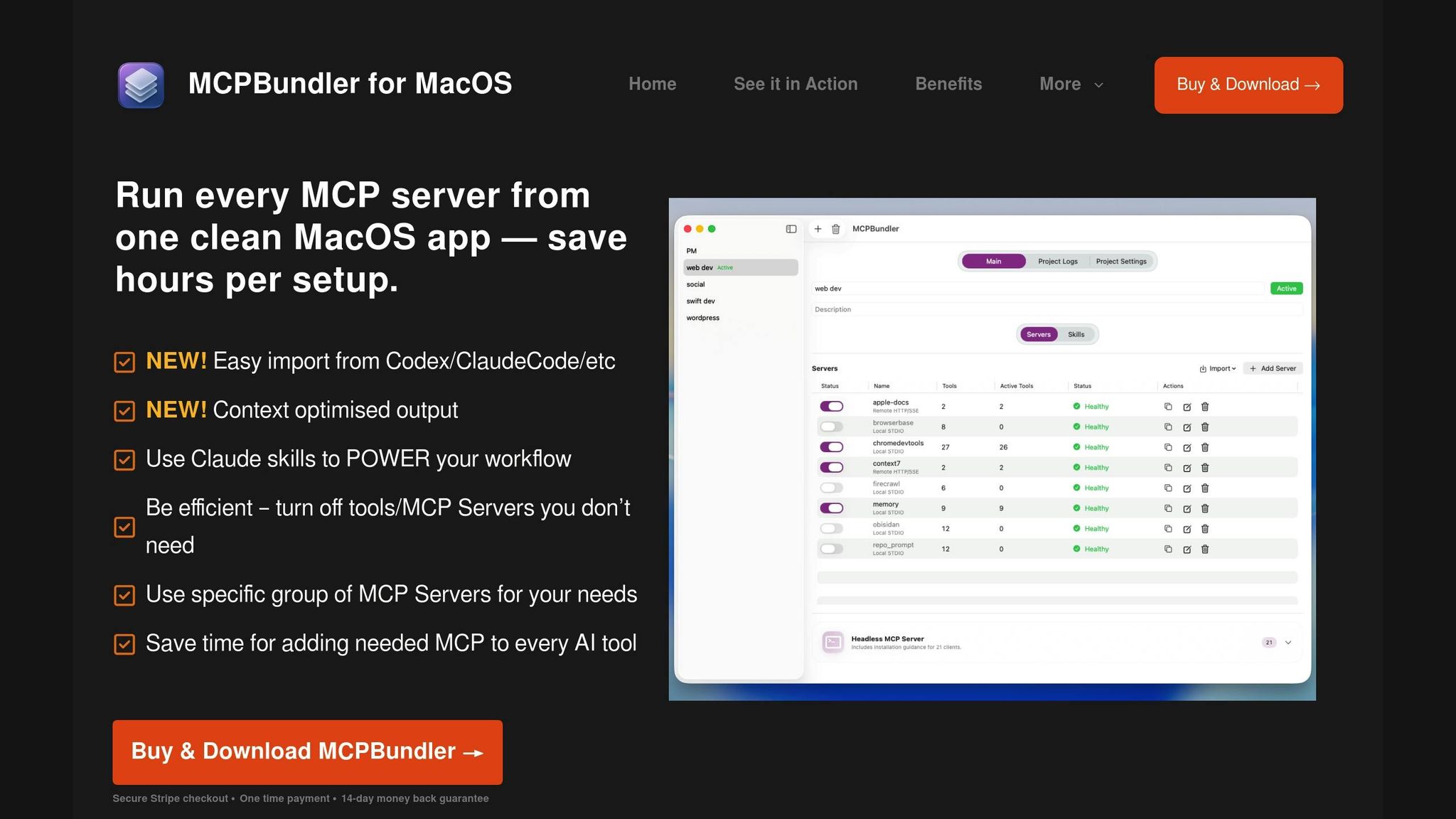
MCP Bundler serves as a centralized tool for managing MCP servers, making it easier to integrate Claude Skills. With features like one-click server toggling and per-tool controls, MCP Bundler helps you tailor workflows to your specific needs.
Key benefits include:
- Automatic Configuration: MCP Bundler generates server configurations automatically, eliminating much of the manual setup.
- Real-Time Monitoring: It provides live health indicators and logs for all connected servers, making troubleshooting straightforward.
- Easy Importing: Quickly import MCP server configurations from various tools without manual adjustments.
- Optimized Performance: Features like auto-archiving for large responses ensure smooth handling of extensive datasets.
For Claude Skills, MCP Bundler enhances integration by streamlining connections between your skills and MCP servers. It also minimizes token usage by displaying only the tools relevant to your workflow, improving response times.
"Claude Code can connect to hundreds of external tools and data sources through the Model Context Protocol (MCP), an open‐source standard for AI‐tool integrations. MCP servers give Claude Code access to your tools, databases, and APIs."
- Claude Code Docs
With your environment set up and MCP Bundler managing your server connections, you’re ready to develop and deploy Claude Skills to automate workflows effectively.
Creating and Deploying Claude Skills for Workflow Automation
Streamline MCP workflows by designing Claude Skills with clear instructions, well-defined metadata, and smart integration strategies.
Building Effective Claude Skills
To create effective Claude Skills, start by drafting a concise SKILL.md file with YAML metadata and straightforward instructions. This file should include essential YAML fields like name, description, and version, along with trigger settings that specify whether the skill activates based on events, time, or conditions.
Your instructions should be detailed and actionable. For instance, instead of saying "analyze the data", provide clear steps like: "Extract numerical values from the dataset, calculate the mean and standard deviation, and generate a summary report highlighting values that exceed two standard deviations from the mean." Specific instructions like these ensure consistent execution of workflows.
Context management is another key factor in building effective skills. Store templates, configuration files, and reference materials in the resources/ directory. This keeps your main instruction set uncluttered while giving Claude the necessary context for handling complex tasks.
For skills that interact with external APIs via MCP servers, include error handling instructions. These should outline how Claude should manage failures, such as retrying operations, executing fallback procedures, or sending notifications when processes encounter issues. This ensures your workflows remain resilient.
Once your skill blueprint is ready, you can move on to packaging and deploying your skill efficiently.
Packaging and Deployment Process
Proper organization of your skill’s file structure is the first step in deployment. Create a dedicated folder for each skill, with subdirectories like scripts/, templates/, and resources/ as needed. The scripts/ folder should hold automation scripts, while templates/ can store standardized formats for reports or notifications.
Use Git repositories to track changes and create deployment branches tailored to different workflow environments. This allows you to test your skills in staging environments before pushing them into production.
When deploying skills, the Claude API’s /v1/skills endpoint is your go-to tool. Include authentication headers and ensure the deployment payload contains your skill’s metadata, instruction set, and any associated resources. For automated deployments, use deployment scripts that can push updates across multiple environments simultaneously.
To maintain consistency across MCP server setups, manage configurations using environment variables. These variables can handle settings like API endpoints, authentication credentials, and resource paths, enabling the same skill to function seamlessly in development, staging, and production environments without requiring modifications.
The MCP Bundler simplifies deployment by automatically configuring the necessary MCP server connections, ensuring a smooth rollout process.
MCP Workflow Integration Points
Once your skill is deployed, integrate it into your workflows at critical junctures:
- Data ingestion points: Use skills to process incoming data automatically. This can include tasks like applying transformations, performing validations, or enriching data as it moves through your workflow.
- API interaction points: Automate complex API workflows involving multiple endpoints, data transformations, and conditional logic. For example, a skill can monitor a database via an MCP server, process changes based on business rules, and update external systems through API calls.
- Decision points: Replace manual review processes with automated decision-making. Skills can evaluate data against predefined criteria, make routing decisions, and trigger downstream actions, ensuring consistency and speeding up workflows.
- Notification and reporting: Automate communications based on workflow events. Skills can generate detailed reports, send alerts when thresholds are exceeded, or provide regular updates to stakeholders. These outputs can be customized based on the recipient and workflow context.
- Cross-system integration: Use skills to connect different tools and platforms through MCP servers. This is particularly useful for organizations managing multiple software systems. Skills can handle tasks like translating data formats, managing authentication, and ensuring data consistency across platforms.
- Batch processing: Handle large-scale operations efficiently by incorporating batching logic, progress tracking, and resumption capabilities. This ensures reliable completion of workflows even when processing large datasets.
sbb-itb-4d6f2e5
Advanced Workflow Automation with Claude Skills
Take MCP workflow automation to a new level with advanced triggers, interconnected skills, and enterprise-grade performance techniques.
Building Advanced Triggers
Advanced triggers turn Claude Skills into dynamic systems that respond intelligently to workflow conditions.
- Event-based triggers: These monitor MCP server data streams and activate when specific conditions arise. For example, you can set a trigger to act when database records surpass a certain limit, API response times lag, or uploaded files include specific patterns.
- Conditional triggers: These evaluate multiple variables at once using complex logic. For instance, a trigger might decide to process large datasets only during off-peak hours when system resources are more available or send alerts only if multiple errors occur within a set timeframe.
- Scheduled triggers: Go beyond basic cron jobs with triggers that adapt to business calendars, avoid maintenance windows, and adjust execution frequency based on workload. They can also retry failed tasks during optimal times for better reliability.
- Webhook-based triggers: These enable real-time integration with external systems. For example, they can process incoming data from third-party apps, validate it, and route it into MCP workflows instantly, creating smooth automation between platforms.
- State-dependent triggers: These keep track of workflow history and the current system state. They ensure tasks are sequenced properly, avoid duplicate processing, and maintain the integrity of multi-step processes.
Connecting Multiple Skills
Once triggers are set up, you can link multiple skills to create responsive and intelligent automation chains.
- Sequential skill chains: In this setup, skills operate in a specific order, passing processed data from one to the next. Each skill builds on the output of the previous one, ensuring tasks are carried out step by step.
- Parallel skill execution: For tasks without dependencies, multiple skills can run simultaneously, speeding up operations like data validation, format conversion, or API calls. Tools like MCP Bundler help allocate resources efficiently for such tasks.
- Conditional branching: Skills can make decisions on the fly, routing data based on its type, urgency, or other criteria. For instance, a master skill might direct financial data to one process and customer feedback to another, all without manual input.
- Error recovery chains: To maintain reliability, set up skills that detect and handle failures. These might try alternative methods, log errors, or notify administrators when manual intervention is required.
- Feedback loops: Build workflows that improve over time. By analyzing outcomes, skills can adjust their parameters to enhance future performance, creating a system that learns and adapts.
Performance and Scalability Tips
To handle large-scale operations effectively, focus on improving performance and scalability.
- Connection pooling: Reuse MCP server connections to reduce overhead and improve response times, especially for workflows handling hundreds or thousands of items per hour.
- Batch processing: Instead of processing items one by one, group them into batches. This approach reduces API calls and enhances throughput, as most MCP servers perform better with batch operations.
- Memory management: For skills handling large datasets, process data in chunks rather than loading everything into memory at once. Use temporary storage for intermediate results and clean up resources after processing.
- Caching: Avoid redundant processing by caching frequently accessed data, results, or configurations. Implement cache invalidation to keep the data fresh while improving efficiency.
- Load balancing: Distribute tasks across multiple MCP servers to manage high-volume workflows. MCP Bundler ensures resources are used effectively during this process.
- Monitoring and alerts: Keep an eye on skill performance and resource usage by integrating monitoring tools. Configure alerts for issues like performance drops, resource exhaustion, or task failures to address problems quickly.
- Asynchronous processing: For long-running tasks, use asynchronous methods. Queue these tasks for background processing and notify dependent skills when results are ready, maintaining workflow responsiveness.
Monitoring and Maintaining Automated MCP Workflows
Keeping automated workflows running smoothly requires ongoing attention and proactive care. Minor issues, if unchecked, can quickly escalate and disrupt your entire automation pipeline. Building on earlier setup steps, this section focuses on how to monitor and maintain your automated workflows effectively.
Real-Time Monitoring with MCP Bundler
MCP Bundler transforms monitoring from a reactive task into a proactive process. Expanding on the server management capabilities discussed earlier, this tool provides real-time health indicators designed specifically for workflow oversight.
The unified control panel uses color-coded server statuses to make problem detection intuitive. Green indicates healthy servers, yellow flags potential concerns, and red signals immediate action is required.
Live log streaming captures critical details like timestamps, error messages, and performance metrics. For example, if a Claude skill fails to process a data batch, the logs will pinpoint the exact error, the problematic data, and the time it occurred.
Workflow Maintenance Best Practices
Consistent upkeep is key to keeping your automated workflows efficient and avoiding major disruptions. Here are some best practices:
- Perform weekly health checks: Regularly review performance metrics, error rates, and resource usage. Watch for trends like slower processing times, rising error rates, or spikes in memory usage, which could signal deeper issues.
- Keep Claude Skills updated: Updates often include performance improvements and bug fixes. Test updates in a staging environment first, and deploy during low-traffic periods to minimize interruptions.
- Standardize logging practices: Ensure your skills log consistent and useful information, including details on processed data, performed operations, and achieved results.
- Monitor external dependencies: Track APIs, databases, and third-party services your workflows rely on. Set up alerts for downtime or performance issues.
- Clean up temporary files and cache: Regularly delete temporary files to avoid storage problems.
- Document workflows thoroughly: Record each workflow’s purpose, dependencies, inputs, outputs, and limitations. This documentation is invaluable for troubleshooting and onboarding new team members.
Common Issues and Solutions
Even with regular maintenance, issues can arise. Addressing these promptly is crucial to prevent disruptions. Below are some common problems and their solutions:
| Issue | Cause | Solution |
|---|---|---|
| Skills timing out | Large datasets or slow API responses | Use batch processing and adjust timeout settings |
| Memory exhaustion | Loading large files into memory | Switch to streaming processing and temporary storage |
| Connection failures | Network issues or server overload | Add retry logic with exponential backoff |
| Duplicate processing | Race conditions or failed cleanups | Implement idempotency checks and robust state management |
| Inconsistent results | Concurrent access to shared resources | Use locking mechanisms and sequential processing |
| High error rates | Invalid input data or configuration | Add input validation and verify configurations |
For example, skills timing out can disrupt workflows. Breaking large tasks into smaller batches and increasing timeout values can resolve this. Similarly, memory exhaustion occurs when skills attempt to load entire large files into memory. Processing data in smaller chunks or streams and using temporary files can mitigate this issue.
Duplicate processing wastes resources and may corrupt data. Design your workflows to be idempotent – ensuring they produce the same result whether executed once or multiple times. Use unique identifiers to track processed items and avoid duplication.
When troubleshooting, start with MCP Bundler’s real-time monitoring to pinpoint which servers or skills are affected. Check the logs for error messages and review the data being processed when the issue occurred. These practices will help ensure your workflows maintain peak performance while supporting the automation goals outlined in this guide.
Conclusion and Key Takeaways
Integrating Claude skills into MCP workflows transforms manual tasks into intelligent, self-managing systems that streamline operations and improve efficiency.
Why It Matters
The combination of Claude skills with MCP workflows brings tangible improvements to operational performance. Organizations adopting these technologies often experience a drastic reduction in manual intervention, with many workflows running autonomously for extended periods.
With Claude skills, data analysis and execution speed up significantly – from minutes to milliseconds – making them especially effective for processing large datasets or handling time-sensitive tasks. Additionally, the automated error recovery features ensure workflows can identify and resolve issues on their own, minimizing disruptions and reducing the need for late-night troubleshooting. This leads to more consistent and reliable output.
These tools also optimize workloads by redistributing tasks and predicting scaling needs, which translates to better hardware utilization and reduced operational costs. When it comes to scalability, Claude skills simplify the coordination of multiple MCP servers, allowing you to expand automation capabilities seamlessly. New skills can be added without disrupting existing processes, ensuring your automation infrastructure grows alongside your business needs.
Steps to Get Started
To take advantage of these benefits, follow these steps to begin integrating Claude skills into your workflows:
- Identify key workflows: Focus on repetitive tasks that consume significant time or are prone to errors. These will deliver the highest impact when automated.
- Prepare your environment: Set up the development tools and requirements outlined earlier in this guide. Start by installing MCP Bundler to manage your servers.
- Start with a pilot project: Choose a workflow with clear inputs and outputs, such as data validation or file processing. This keeps the initial project manageable while demonstrating value early on.
- Use configuration import tools: MCP Bundler’s ability to import existing configurations saves time and reduces setup errors, ensuring a smoother deployment process.
- Track performance metrics: Use your existing monitoring tools to establish baseline metrics and measure improvements after automation is implemented.
- Build a skills library: Develop reusable components that can be applied across multiple workflows. Document each skill thoroughly to simplify future updates and troubleshooting.
FAQs
What are the main advantages of using Claude Skills to automate MCP workflows?
Integrating Claude Skills into MCP workflows can transform how organizations handle repetitive tasks. With capabilities designed for tasks like document generation, data analysis, and specialized industry processes, these skills help ensure tasks are completed with greater accuracy and efficiency.
By using Claude Skills, teams can shift their focus to more strategic and impactful work, while routine operations are handled consistently and precisely. This approach not only saves time but also boosts overall productivity, offering a smart solution for streamlining modern workflows.
How can I keep my Claude Skills effective and up-to-date over time?
To keep your Claude Skills working effectively, make sure they are concise, well-organized, and customized to fit your specific workflows. Regular testing in practical scenarios can highlight areas that might need adjustments, allowing you to fine-tune their performance.
It’s also important to revisit your skills periodically to ensure they align with updates or changes in your MCP workflows. Taking this proactive step helps ensure your skills remain efficient and relevant as your needs evolve.
What challenges might arise when using Claude Skills, and how can you overcome them?
Managing the context window effectively is a key challenge when deploying Claude Skills. The system uses something called progressive disclosure. Here’s how it works: Claude first loads only metadata to determine what’s relevant. It only pulls in the full content when absolutely needed. This approach helps keep performance smooth and avoids overwhelming the context window.
To get the best results, design workflows that focus on the most relevant tasks and cut down on unnecessary data processing. By understanding how Claude Skills manage metadata and content, you can fine-tune your MCP workflows to run more efficiently.