

Managing AI workflows can be frustrating without the right tools. From server downtime to manual configurations, inefficiencies can slow progress. But with the right strategies, you can simplify processes, reduce errors, and focus on innovation. Here’s the quick answer:
- Use MCP Bundler: Centralizes server management, offers one-click controls, and simplifies configurations.
- Real-Time Health Monitoring: Instantly spot server issues with clear visual alerts.
- Automate Configurations: Save time and avoid errors with system-generated settings.
- Add Claude Skills: Enhance workflows with advanced AI features.
- Optimize Context and Tools: Tailor tool usage for better performance.
- Strengthen Security: Centralized access control protects sensitive data.
- Archive Large AI Responses: Manage oversized outputs to maintain efficiency.
These strategies, powered by MCP Bundler, can improve efficiency and reliability across your AI projects. Whether you’re managing a few servers or scaling enterprise operations, these tips provide actionable solutions to common challenges.
1. Use MCP Bundler for Centralized Server Management
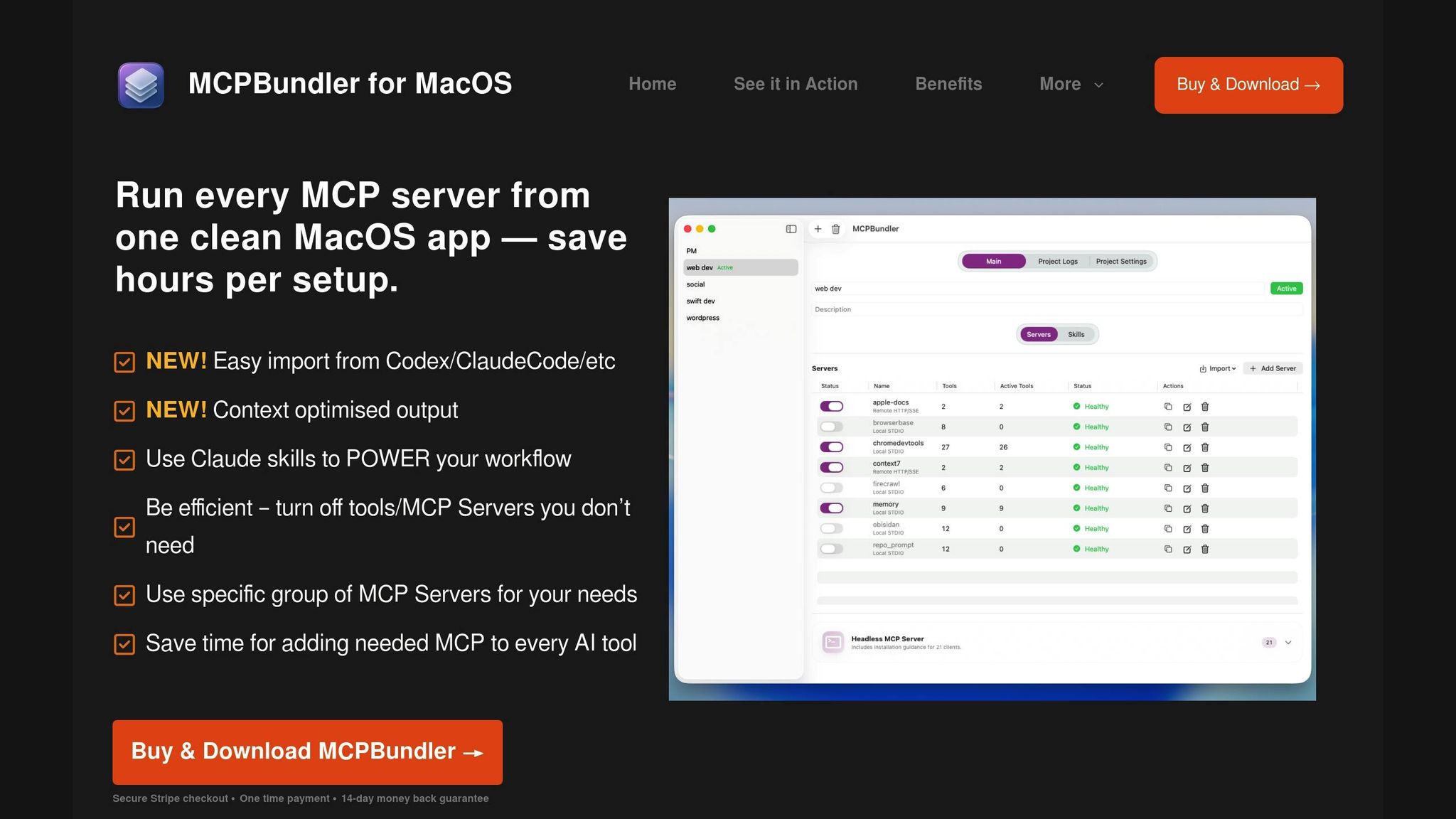
Why MCP Bundler Matters for Server Management
Managing multiple MCP servers across various projects can quickly become chaotic. Teams often deal with scattered configuration files, manually track server statuses, and struggle to maintain consistency across different setups. This is where MCP Bundler steps in, offering a centralized solution that simplifies server management.
With MCP Bundler, you can view all your servers in one macOS application. No more bouncing between terminal windows or digging through directories to start or stop servers. Its one-click server toggling feature eliminates the need for complex command-line commands, streamlining the entire process and boosting efficiency.
Boosting Workflow Efficiency in AI Projects
MCP Bundler’s per-tool control feature is a game-changer for customizing workflows. By activating only the tools you need, you minimize resource consumption and enhance system responsiveness. This targeted approach not only optimizes performance but also avoids unnecessary overhead.
The real-time health indicators and logs are another standout feature. They allow you to monitor server performance instantly, catching potential issues before they escalate. This proactive monitoring ensures that a single server problem doesn’t derail your entire AI workflow.
Additionally, the auto-generated MCP configurations save valuable time during setup. Instead of manually creating configuration files, the tool generates them for you, tailored to your server choices and requirements. These features collectively make AI workflows smoother and more reliable.
Seamless Integration with Existing MCP Setups
Transitioning to MCP Bundler is straightforward, thanks to its ability to import existing MCP server configurations. This means you don’t have to start from scratch – your current setup is seamlessly integrated into the Bundler’s interface. This compatibility ensures a smooth adoption process without disrupting ongoing projects.
As a macOS-native application, it blends effortlessly into your development environment, offering a familiar and user-friendly interface.
Automation and Scalability Made Simple
MCP Bundler is built to handle growth. Its architecture supports scaling as your server deployments expand. Features like Claude skills support enable more advanced AI interactions, while the tool hiding option keeps the interface clean even when managing numerous servers.
To address storage concerns, the auto-archiving of oversized responses ensures that large datasets don’t clog your system. This automated maintenance reduces manual tasks, freeing up your team to focus on creating better AI solutions instead of worrying about infrastructure management.
2. Set Up Real-Time Health Monitoring
Relevance to MCP Server Management
Real-time health monitoring transforms how you manage MCP servers by providing instant insights into system performance. Without proper monitoring, server failures can ripple through your AI workflows, leading to unplanned downtime and potential data loss. With MCP Bundler’s real-time health indicators, you gain immediate feedback on server status, cutting out much of the uncertainty often tied to traditional command-line monitoring.
This system keeps an eye on critical metrics like memory usage, response times, and connection stability across all MCP servers. A simple color-coded system – green, yellow, and red – alerts you to potential issues, allowing for quick action. Plus, centralized log viewing consolidates individual server logs into one interface, making it much easier to spot patterns, identify bottlenecks, and troubleshoot with speed. These insights help safeguard your AI workflows from unexpected performance hiccups.
Impact on AI Workflow Efficiency
Effective health monitoring directly improves the reliability and performance of your AI workflows. When servers operate at peak efficiency, tasks are completed faster and with fewer interruptions. Real-time feedback also highlights server load imbalances, enabling you to redistribute workloads promptly. This proactive approach ensures smooth workflow execution, even during high-demand periods.
For instance, if certain tasks consistently lag on specific servers, you can analyze your resource allocation and decide whether to adjust or upgrade for better performance.
Ease of Implementation in Existing MCP Environments
Integrating health monitoring into your current MCP setup is seamless with MCP Bundler. Once servers are imported, MCP Bundler auto-detects them and begins monitoring right away. Health indicators appear immediately in the interface, giving you instant visibility into system performance.
For teams transitioning from manual monitoring, the intuitive color-coded alerts and straightforward status messages make the shift simple. Technical team members can explore detailed logs for deeper analysis, while project managers can quickly gauge overall system health at a glance.
Support for Automation and Scalability
As your MCP infrastructure grows, MCP Bundler’s monitoring capabilities scale effortlessly. Whether managing five servers or fifty, the system adapts automatically. It even automates responses to common issues – like a one-click server restart to address stress indicators – minimizing downtime and keeping your AI workflows running smoothly. This scalability ensures that your monitoring solution evolves alongside your infrastructure, maintaining efficiency as your needs expand.
AI for Workflow Optimization | Exclusive Lesson
3. Automate MCP Configuration Management
Once you’ve set up real-time monitoring, the next step to streamline your AI workflows is automating configuration management.
Why Automating MCP Configurations Matters
After monitoring, ensuring consistent configurations across your MCP servers is crucial for maintaining smooth operations. As your infrastructure grows, manually managing configurations becomes cumbersome and prone to errors. Inconsistent settings can lead to unexpected failures or downtime, creating unnecessary headaches.
This is where MCP Bundler steps in. It eliminates the need for manual edits by automatically generating standardized configurations. Instead of risking human error, the system ensures every server runs with the correct parameters. Plus, with centralized management, updates are applied across all configurations automatically, saving both time and effort.
Boosting Workflow Efficiency with Automation
When configuration management is automated, your workflows become more reliable. Consistent and validated configurations across servers mean fewer failures tied to misconfigurations. This is particularly important for complex AI workflows that rely on multiple servers working in harmony.
Automation also slashes setup time and reduces the likelihood of errors, allowing your AI tasks to proceed without unnecessary interruptions.
Seamless Integration with Existing MCP Setups
One of the standout features of MCP Bundler is how easily it integrates with your current environment. This eliminates the need for manual adjustments and helps highlight any inconsistencies that might have previously gone unnoticed.
Once implemented, the system takes over tasks like managing server settings, configurations, environment variables, and connection setups through a unified interface. When paired with real-time monitoring, this automation ensures your AI workflows remain stable and efficient.
Scaling and Disaster Recovery Made Simple
As your MCP infrastructure grows, automated configuration becomes even more essential. Adding new servers no longer requires manual setup – MCP Bundler applies your existing templates automatically, ensuring they integrate seamlessly with your current environment.
The system is built to scale, whether you’re managing a handful of servers or a sprawling deployment. Customizable templates let you standardize common settings while accommodating specific needs for different server types or applications.
Automation also shines in disaster recovery scenarios. If a server fails or needs rebuilding, the system’s templates allow for quick restoration, minimizing downtime. For production AI workflows that demand high availability, this capability is a game-changer, supporting both rapid expansion and reliable recovery when it matters most.
4. Add Claude Skills for Better AI Workflows

By combining automated configuration and real-time monitoring, Claude skills take your workflows to the next level. The MCP Bundler comes equipped with these tools, simplifying complex processes and helping you get more done with less effort.
Relevance to MCP Server Management
Claude skills enhance the capabilities of your MCP servers by seamlessly adding advanced AI-driven features to your existing setup. The best part? They integrate effortlessly, so you don’t have to worry about overhauling your current configuration. This keeps your operations smooth while introducing more sophisticated functionality.
Impact on AI Workflow Efficiency
With Claude skills, your MCP environment becomes a powerhouse for managing AI workflows. These tools eliminate the need to jump between platforms, reducing the chance of errors and saving valuable time. By keeping everything within a single workflow, your servers can deliver results that are precise and on-point. This not only improves efficiency but also ensures a more reliable and consistent output.
Ease of Implementation in Existing MCP Environments
Integrating Claude skills into your MCP setup is straightforward, thanks to the MCP Bundler’s unified control panel. You can pick and choose the features that align with your specific needs, ensuring your environment stays streamlined while gaining powerful new tools. This flexibility makes implementation quick and hassle-free.
Support for Automation and Scalability
Claude skills are designed to handle repetitive tasks automatically and scale alongside your operations. They work hand-in-hand with MCP Bundler’s existing features, like real-time monitoring and automated configurations, creating a highly efficient and scalable system. This automation not only simplifies complex tasks but also sets the stage for future improvements to your workflows.
sbb-itb-4d6f2e5
5. Improve Context and Tool Usage
Building on automation and real-time monitoring, fine-tuning context and tool usage takes your AI workflows to the next level. By ensuring precise information is shared and carefully managing available tools for specific tasks, you can significantly enhance the accuracy and efficiency of your system.
Relevance to MCP Server Management
Optimizing context has a direct impact on how MCP servers handle and respond to requests. When servers are overloaded with irrelevant data, computational resources are wasted. On the other hand, insufficient context can result in vague or generic responses.
This is where MCP Bundler comes in. It allows you to control which tools Claude accesses during specific workflows. By narrowing the focus to only the most relevant tools and information, your AI assistant can deliver more precise and reliable results.
The control panel simplifies tool configuration, enabling you to create tailored setups for various use cases. This ensures that each workflow is equipped with the exact tools it needs – no more, no less.
Impact on AI Workflow Efficiency
Proper context management significantly boosts both the speed and quality of AI processing. When tools aren’t bogged down by irrelevant data or distracted by unnecessary features, they can zero in on delivering actionable results.
By curating the toolset for each specific workflow, you minimize the chances of your AI assistant selecting inappropriate tools. This targeted approach leads to more consistent and dependable outcomes, ensuring your workflows operate smoothly and effectively.
Ease of Implementation in Existing MCP Environments
You don’t need to overhaul your current setup to enhance context and tool usage. MCP Bundler integrates seamlessly with existing MCP server configurations, allowing for gradual improvements across your workflows.
The per-tool control feature lets you fine-tune individual components without disrupting the entire system. This granular approach means you can test and refine strategies on a smaller scale before rolling them out more broadly. Plus, configuration changes take effect immediately, offering real-time feedback to help identify what works best for your needs.
Support for Automation and Scalability
As operations grow, manually managing context and tools becomes increasingly difficult. MCP Bundler’s automated features ensure your optimization strategies scale effortlessly alongside your workflows.
With real-time health monitoring and automated configuration management, your system remains organized and efficient, even as demands increase. By integrating optimized context and customized tool usage, your MCP environment becomes more agile, responsive, and ready to handle complexity with ease.
6. Track and Archive Large AI Responses
Managing large AI responses effectively is key to avoiding workflow slowdowns. As AI models produce increasingly detailed outputs, these responses can quickly exceed context window limits, consuming excessive tokens and driving up costs. MCP Bundler offers a smart solution by tracking and archiving these responses automatically, ensuring smooth workflows.
Relevance to MCP Server Management
Handling large AI responses can be particularly challenging in MCP server setups, where limited context windows can significantly affect performance. When AI models generate lengthy outputs, these can overwhelm the context space, leading to inefficiencies, higher costs, and even workflow disruptions.
MCP Bundler addresses this issue by automatically detecting and archiving oversized responses before they impact server operations. This proactive system prevents context window overflow, allowing MCP servers to process subsequent tasks without delays.
With centralized management, administrators can apply consistent archiving policies across all connected servers. Instead of configuring each server individually, unified rules govern how large responses are handled and stored throughout the entire MCP environment, streamlining operations and reducing manual effort.
Impact on AI Workflow Efficiency
Efficiently managing large datasets and intermediate results is crucial to maintaining workflow performance and controlling token usage. Without proper archiving, large responses can take up valuable context space, limiting the model’s ability to process new inputs and increasing the overall cost of operations.
MCP Bundler’s auto-archiving feature clears context space while securely storing data for later use. This ensures that AI models always have enough room to process new tasks, keeping workflows uninterrupted.
Additionally, the system offers detailed tracking of archived responses. This visibility helps teams identify patterns in workflows that frequently generate large outputs, enabling them to fine-tune processes, minimize unnecessary token usage, and enhance overall performance. These improvements simplify setup and optimize resource allocation.
Ease of Implementation in Existing MCP Environments
MCP Bundler integrates seamlessly into existing setups with minimal configuration. Administrators can easily define response size thresholds and archiving rules through a unified control panel. Once configured, these settings are applied across all servers, ensuring consistent handling of large responses without requiring individual adjustments.
The system works perfectly with existing Claude skills and tools, ensuring archived responses remain accessible when needed while staying unobtrusive during normal operations. This compatibility makes the transition smooth and hassle-free.
Support for Automation and Scalability
As MCP environments expand to handle more complex AI tasks, MCP Bundler’s automated archiving scales effortlessly to accommodate growing volumes.
The system supports the creation of reusable, parameterized AI workflows that adapt dynamically to varying response sizes. This flexibility ensures that your MCP setup can handle diverse requirements and scaling demands without compromising performance or requiring manual intervention. It’s a unified approach that keeps AI workflows efficient and streamlined.
Comparison Table
Here’s a detailed look at strategies to fine-tune your MCP server performance. This table outlines the key strategies, their benefits, potential challenges, and the scenarios where they shine.
| Strategy | Pros | Cons | Best For |
|---|---|---|---|
| Centralized Server Management | Simplifies operations with a single control panel, prevents configuration drift, and supports bulk actions across servers | Requires initial setup and introduces a single point of failure if not properly configured | Teams managing multiple servers or organizations needing consistent policies |
| Real-Time Health Monitoring | Identifies issues early and provides actionable insights | Can lead to alert fatigue if thresholds are poorly set; needs dedicated monitoring infrastructure | Production environments and critical AI workflows |
| Automated Configuration Management | Reduces manual errors and ensures consistent environments | Requires technical expertise for setup and offers limited flexibility for unique configurations | Large-scale deployments or teams with standardized workflows |
| Claude Skills Integration | Adds AI functionality with pre-built features | May need customization for specific use cases | Workflows requiring integrated AI capabilities and teams needing quick AI feature deployment |
| Context and Tool Optimization | Improves response accuracy and reduces unnecessary tool clutter | Needs regular updates to remain effective and risks hiding useful tools if misconfigured | Cost-conscious operations and diverse tool-dependent workflows |
| Response Archiving | Maintains workflow continuity, avoids context overflow, and allows access to historical data | Needs efficient storage management, and archived data can become outdated | High-volume AI operations with large output demands |
Implementation Insights
Getting Started
Start with centralized management and real-time monitoring for immediate improvements with minimal complexity. Once these are in place, consider adding automated configuration management and enhanced security controls to address more specific needs.
Budget Considerations
The MCP Bundler provides all these features for a one-time cost of $16(EUR 15), but the primary expense lies in the time and effort required for setup and ongoing maintenance.
Scaling Effectively
Automated strategies, like configuration management and response archiving, become increasingly valuable as your MCP environment grows. While manual methods might work for smaller setups, they can quickly become cumbersome as operations expand.
Conclusion
The seven tips outlined earlier serve as a practical guide for streamlining AI workflows on MCP servers. By tackling the challenges posed by modern AI operations, these strategies lay the groundwork for measurable improvements in efficiency and performance.
Adopting these practices could boost productivity by an impressive 4.8 times while cutting errors nearly in half – by 49%. Leveraging tools like MCP Bundler for centralized server management, combined with real-time monitoring and automated configurations, equips your systems to meet the ever-growing demands of AI. With 74% of businesses planning to increase their AI investments by 2025, having optimized workflows in place ensures you’re ready to scale alongside this surge.
The technical advantages are equally compelling. For instance, using MCP for code execution can slash token usage from 150,000 to just 2,000 for certain tasks, translating into a staggering 98.7% savings in both costs and time.
"Anthropic famously called MCP the ‘USB-C for AI,’ and it’s a fitting analogy. Introduced in late 2024, MCP is an open standard designed to create a universal, secure way for AI models to connect with external tools and data sources. It replaces a chaotic world of custom, brittle API integrations with a standardized protocol." – Skywork
Centralized management with MCP Bundler forms the backbone of monitoring, security, and automation efforts. Each of these elements strengthens the others, creating a system of compounded benefits.
Begin with the basics: centralized management and real-time monitoring are straightforward to implement and deliver immediate returns. As you gain experience, you can expand into automated configurations and advanced security measures. With the global AI server market expected to grow from 639,000 units to 1.323 million by 2025, scaling efficiently isn’t just a goal – it’s a necessity. These strategies ensure you’re prepared to manage this growth effectively.
FAQs
What are the advantages of incorporating Claude skills into MCP server environments?
Integrating Claude skills into your MCP server setup offers several standout advantages. These skills can supercharge your AI workflows by automating intricate tasks, boosting system efficiency, and speeding up decision-making. By tapping into Claude’s capabilities, you can simplify operations and cut down on manual effort, ultimately saving time and resources.
What’s more, Claude skills are built to work hand-in-hand with MCP server environments, ensuring a smooth and adaptable integration process. This means your current infrastructure can easily handle growing demands while still delivering top-notch performance. Incorporating Claude skills allows you to fully harness the power of AI-driven processes within your MCP setup.
How does MCP Bundler’s real-time health monitoring help prevent server issues in AI workflows?
MCP Bundler keeps a close watch on your servers with real-time health monitoring, spotting potential issues before they disrupt your AI workflows. It tracks critical performance metrics like CPU usage, memory capacity, and network activity to ensure everything runs smoothly.
Whenever anomalies or resource limitations arise, the system sends instant alerts, giving you the chance to fix problems quickly and avoid extended downtime. This means you can keep your AI operations running seamlessly and stay focused on hitting your project milestones without surprise interruptions.