

Dynamic resource allocation is transforming how AI systems operate by making them faster, more efficient, and cost-effective. Unlike static setups that waste resources or struggle under peak demand, dynamic systems adjust computational resources in real-time based on workload needs. This approach ensures AI workflows handle complex tasks smoothly without over-provisioning or downtime.
Key Benefits:
- Performance Boost: Resources scale up or down instantly, matching demand for faster processing.
- Cost Savings: Pay only for what you use – cut infrastructure costs by up to 75%.
- Efficient Usage: Redistributes resources to active tasks, eliminating waste.
How It Works:
- Real-Time Monitoring: Tracks CPU, memory, and GPU usage to detect spikes or idle periods.
- Predictive Models: Anticipates future resource needs using historical trends.
- Automation: Instantly reallocates resources without manual intervention.
For example, e-commerce platforms use predictive models during high-demand seasons like Black Friday to ensure smooth operations. Tools like MCP Bundler simplify managing resource-heavy AI setups by grouping and toggling servers with a single click, keeping workflows efficient.
Unleashing the Power of DRA (Dynamic Resource Allocation) for Just-in-Time GPU Slicing
How Dynamic Resource Allocation Works
Dynamic resource allocation improves AI workflows by combining real-time monitoring, predictive forecasting, and automated decision-making. Each of these components works together to ensure your AI systems run smoothly and efficiently.
Real-Time Monitoring and Feedback Loops
Real-time monitoring keeps a close eye on key metrics like CPU, memory, GPU, storage, and network usage. This constant watch enables the system to detect both gradual trends and sudden changes. For example, if an AI model processes a particularly complex query, the system quickly notices the spike in computational demand. Similarly, if a resource, like a server or agent, unexpectedly goes offline, this change is immediately flagged. Whether it’s a traffic surge, equipment failure, or potential security issue, instant alerts ensure the system can respond quickly.
Beyond just flagging issues, the monitoring system analyzes the incoming data to spot patterns and anomalies. This analysis helps the system understand how different components interact and informs decisions about resource allocation. For instance, when a tool or process is no longer actively in use, it might be moved to temporary storage or hidden from the active workspace, reducing the computational load. While users can still access it when needed, the overall system efficiency improves. Modern AI agents also integrate with resource management tools, allowing them to scale database capacity, request virtual machines, or adjust network bandwidth on the fly.
Predictive Modeling for Resource Forecasting
Real-time monitoring handles immediate needs, but predictive modeling looks ahead to anticipate future demands. Using historical data, machine learning algorithms can forecast resource requirements based on factors like project schedules, task dependencies, and potential risks.
These predictive models learn from past workloads to identify patterns, such as peak traffic times or common bottlenecks. By analyzing this data, the system can proactively scale resources instead of waiting for issues to arise. A great example of this is Autodesk‘s BIM 360 platform, which was used during the construction of MuskGen, a large-scale sustainable energy facility. By leveraging predictive modeling to adjust resources based on real-time progress and weather data, the project achieved a 15% reduction in timeline and saved 12% on equipment and labor costs.
"Predictive capabilities of AI can help avoid costly last-minute resource scrambles or project delays." – Dart AI Blog
E-commerce companies also rely on predictive analytics during high-demand periods like Black Friday. These models help allocate warehouse space and delivery resources ahead of time, ensuring popular products remain in stock and delivery routes are optimized.
For AI workflows, predictive algorithms ensure that critical resources – like memory, processing power, and storage – are allocated in advance of complex tasks. This proactive approach reduces delays, prevents overprovisioning, and keeps infrastructure costs under control while maintaining performance.
Automation and Decision-Making Processes
With insights from real-time monitoring and predictive forecasting, automation takes over to adjust resources as needed. This eliminates the need for manual intervention, as the system can make changes instantly.
Automated systems follow predefined rules and thresholds. For instance, if CPU usage consistently exceeds a certain limit, the system can automatically add more processing power. On the flip side, if memory usage drops below a set level for a sustained period, the system can release unused resources.
These decisions can range from simple rule-based actions to more advanced machine learning models that consider multiple factors at once. Over time, feedback mechanisms allow the system to refine its decision-making, learning from past adjustments to improve future performance.
Automation doesn’t stop at just scaling resources; it manages the entire resource lifecycle. This includes provisioning new assets when needed, reallocating capacity to priority tasks, and decommissioning resources that are no longer required. In complex workflows involving multiple AI agents with unique needs, automation ensures a smooth handoff. As one agent finishes its task and releases resources, another can immediately take over, keeping operations running without interruption.
How to Implement Dynamic Resource Allocation in AI Workflows
Here’s a guide to seamlessly incorporating dynamic resource allocation into your AI workflows.
Setting Up Real-Time Monitoring Tools
To allocate resources effectively, you need accurate, real-time data. Start by identifying the key metrics for your workflows – CPU usage, memory, GPU utilization, storage I/O, network bandwidth, and API response times. Every AI workflow has its own unique demands, so tailor your monitoring setup to match those specific needs.
Choose tools that provide continuous, detailed monitoring at the process level. It’s important that these tools integrate smoothly with your existing infrastructure, whether you’re operating in the cloud, on-premises, or in a hybrid environment.
For workflows utilizing MCP (Model Context Protocol) servers, focus on metrics like server health, tool call frequency and duration, output sizes, and the frequency of temporary storage use. This level of visibility allows you to make smarter decisions, like when to offload tools from active memory or redirect outputs to temporary files, which can lighten the computational load.
Set clear alert thresholds for critical resource levels. Alerts should be actionable, giving specific details such as the processes causing high memory usage and whether the issue is temporary or sustained. This ensures that both you and your automated systems can respond effectively.
Once you’ve established robust monitoring, you can move on to predicting future resource needs.
Integrating Predictive Models with Existing Infrastructure
Predictive models are key to staying ahead of resource demands. Start by gathering historical data on resource usage – this includes project timelines, utilization trends, traffic patterns, and workflow outcomes. The more data you collect, the better your predictions will be.
Use this historical data to train predictive models that can identify patterns and correlations. For instance, you might notice that certain AI queries consistently demand more GPU memory or that peak processing loads occur at specific times of day. These insights allow your models to forecast resource needs based on both current conditions and scheduled tasks.
To integrate predictive models into your workflow, connect them to your project management tools, resource schedulers, and compute infrastructure via APIs. These connections enable your models to pull real-time metrics, check resource availability, and send recommendations for allocation adjustments.
Don’t forget to factor in external elements like market trends, seasonal shifts, or planned events. For example, if you’re running AI-driven customer service during a product launch or holiday season, your predictive models should account for the expected surge in demand.
The output from these models should provide clear, actionable forecasts – detailing how many resources are needed, when they’re required, and for how long. This allows your infrastructure to proactively allocate resources rather than scrambling to react.
Before deploying predictive models fully, test them in real-world scenarios. Run them alongside your current systems to compare their forecasts with actual resource consumption. This validation phase helps refine the models and ensures their reliability.
Once your predictive models are fine-tuned, you’re ready to automate resource adjustments.
Automating Resource Reallocation
With monitoring and predictive insights in place, automation can take over, dynamically reallocating resources without the need for manual intervention.
Start by setting clear rules and thresholds for your automation system. For example, you might configure it to automatically scale up GPU capacity if utilization exceeds 80% for more than five minutes or to release unused memory when consumption drops below 30% for an extended period.
Begin with simple, rule-based automation. Once these rules operate reliably, you can introduce more advanced systems, such as machine learning models that analyze multiple factors simultaneously and improve based on past allocation decisions.
Your automation system must have the necessary permissions to make changes across your infrastructure. This includes access to provisioning APIs for cloud services, container orchestration platforms, and database systems. Use role-based access controls and maintain audit logs to ensure all automated actions are traceable and appropriate.
For workflows involving multiple AI agents with varying resource needs, automation should manage the entire lifecycle. For instance, when one agent completes its task and releases resources, the system should immediately reallocate those resources to the next task in line. This prevents resource idling and keeps operations running smoothly.
In cases where dynamic allocation involves hiding tools after use or redirecting large outputs to temporary files, automation can handle these transitions effortlessly. For example, if an AI agent receives a large response, the system can automatically store it in a temporary file and provide a reference for retrieval when needed.
Finally, implement feedback mechanisms so the system can learn from its decisions over time. Always maintain a manual override option for situations that require human judgment. Track the triggers, actions, and outcomes of your automation to identify areas for improvement and refine the system as needed.
sbb-itb-4d6f2e5
Measuring the Impact of Dynamic Resource Allocation
Once dynamic resource allocation is implemented, it’s crucial to measure its impact using clear metrics. This not only helps validate its benefits but also identifies areas for further improvement, ensuring the efficiency gains are tangible and measurable.
Key Performance Metrics to Track
To evaluate how dynamic resource allocation influences your AI workflows, focus on specific key performance indicators (KPIs). These metrics provide a clear picture of its effectiveness:
- Resource Utilization Rates: Monitor the usage of CPU, GPU, memory, and storage. The goal is to maintain a balanced load during peak times while minimizing wasted resources during idle periods.
- Latency and Response Times: Measure processing speeds, including average response times, peak latencies, and the percentage of requests that meet service-level agreements (SLAs).
- Cost Efficiency: Track spending on compute, storage, and network resources relative to task volume. This helps calculate the cost per transaction and identify savings.
- Task Completion Times: Analyze the time taken from data ingestion to output delivery. Aim for a 25–40% reduction in completion times and a 15–30% improvement in resource utilization.
- Error Rates and System Stability: Keep an eye on task failures, timeouts, and crashes. Dynamic allocation should help prevent resource exhaustion and maintain system stability.
- Automated Monitoring: Use automated alerts and dashboards to quickly detect and address performance deviations.
Comparing Before-and-After Data
Start by collecting baseline data over a two- to four-week period under normal operating conditions. This should include metrics from both average workloads and peak demand periods. Once dynamic allocation is implemented, gather the same metrics under similar conditions to enable a direct comparison.
Real-world examples highlight the benefits of this approach. In one instance, a construction project using AI-driven resource management achieved a 15% reduction in project timelines and saved 12% on equipment rentals and labor costs. Similarly, IBM reported a 30% increase in sprint completion rates and a 25% reduction in code review times in their AI-enhanced development workflows.
Healthcare applications also showcase impressive results. One deployment reduced patient wait times by 44.44% (from 45 to 25 minutes), improved staff utilization by 21.43% (from 70% to 85%), and increased resource allocation efficiency by 23.08% (from 65% to 80%).
When reviewing the data, go beyond averages. Examine performance distribution to see if variability has decreased and identify any unexpected trade-offs. Monthly reviews can uncover trends and guide refinements. These improvements provide the foundation for evaluating financial returns.
Calculating ROI and Long-Term Savings
To assess the financial impact, compare costs and savings. Start by calculating the total implementation cost, which includes software licenses, infrastructure updates, staff training, and consulting fees.
Next, evaluate post-implementation infrastructure costs against baseline spending. Consider direct savings, such as reduced cloud bills and hardware expenses, alongside indirect benefits like increased productivity, which enables teams to take on more projects or focus on higher-priority tasks.
Use the following formula to estimate ROI:
(Total Annual Savings – Implementation Cost) / Implementation Cost × 100.
For long-term projections, keep in mind that benefits often grow as workloads scale. For example, Siemens‘ AI-driven factory optimization led to a 20% boost in production efficiency, an 18% cut in energy consumption, and a 35% drop in unplanned downtime.
Non-financial returns are equally important. Enhanced customer satisfaction, faster time-to-market, reduced staff burnout, and improved system reliability all contribute to success. In the healthcare example, patient satisfaction scores rose by 30.77%, while staff burnout rates dropped by 42.86%. These results emphasize the value of dynamic resource allocation, both in terms of performance and cost-effectiveness, for AI workflows.
Tools and Applications for Dynamic Resource Allocation
Managing resources dynamically requires tools that provide centralized oversight and precise control, allowing adjustments to happen in real time.
Centralized Resource Management with MCP Bundler
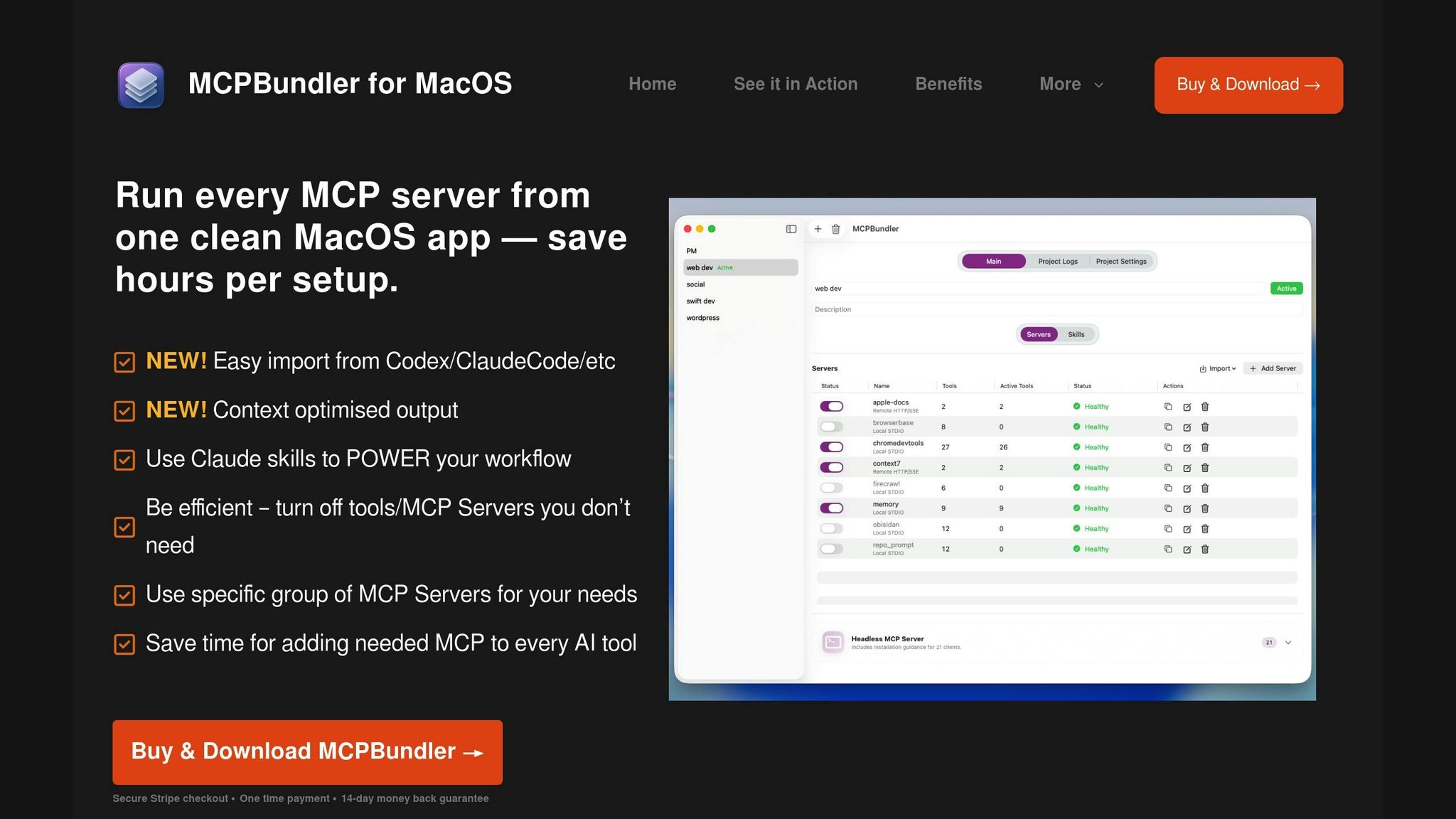
Handling multiple MCP servers can quickly spiral into a logistical nightmare without a centralized solution. MCP Bundler simplifies this by serving as a local proxy that consolidates the management of all MCP servers – whether they’re local STDIO or remote HTTP/SSE connections – into a single macOS application.
The standout feature? Instant toggling and grouping of servers. Instead of tediously configuring each connection, you can enable or disable entire MCP setups with just one click. Imagine you’re working on a code review project: you can activate only the tools needed for that task. Later, you can seamlessly switch to a different bundle tailored for another workflow – all without manually adjusting settings.
The app also offers per-tool control, letting you hide tools once their tasks are complete. When hidden, tools archive their large outputs as temporary files rather than keeping them in active memory. These temporary files can be accessed later through the read_tmp_file tool or CLI commands, ensuring a clean workspace while still retaining important data.
Real-time health indicators and request logs make monitoring straightforward. If connection issues arise, you can troubleshoot quickly without digging through endless server configurations. Plus, MCP Bundler generates JSON configuration snippets automatically, making it a breeze to connect as a single MCP endpoint to any client.
At just $15 for lifetime access, MCP Bundler provides unified control, supports Claude skills, and automatically archives oversized responses. This streamlined approach enhances resource management, aligning with earlier workflow improvements.
Optimizing AI Performance with Integrated Tools
Centralized control is just the beginning – integrating AI tools takes dynamic resource allocation to the next level. The aim is to automate feedback loops so resources adjust based on real-time performance data, minimizing the need for manual intervention.
For instance, tools automatically hide when their tasks are finished, and large outputs are archived to temporary files. This prevents active memory from being bogged down by massive datasets while still allowing lightweight access to archived data. This approach enables AI workflows to handle larger data volumes without straining resources.
Bundle switching is another game-changer. As workload profiles shift – say, from data analysis to content creation – you can reconfigure your MCP setup instantly. This eliminates the need for server restarts or manual reconfigurations, allowing you to adapt to changing resource demands on the fly.
These features create an environment where AI workflows can scale efficiently. Lean configurations can expand dynamically to handle resource-intensive tasks, ensuring your tools align perfectly with your workflow needs.
Best Practices for Tool Configuration
To get the most out of dynamic resource allocation, it’s essential to configure your tools thoughtfully. Start by mapping out your workflows to determine which tools and resources are critical for each project. Document peak usage patterns, typical data volumes, and performance needs to create purposeful bundles rather than arbitrary groupings.
Group tools by context. For example:
- A data processing bundle could include connectors, transformation utilities, and visualization tools.
- A content creation bundle might focus on language models, image generation, and formatting utilities.
Set health monitoring thresholds tailored to your performance requirements. Alerts for high resource usage, slow response times, or rising error rates can serve as early warnings of system stress, prompting automatic resource adjustments before users experience issues.
Before deploying bundles in production, test them under realistic conditions. Run typical tasks to ensure all necessary tools are available and that hiding certain tools doesn’t disrupt functionality. Pay close attention to workflows that might need tools from multiple bundles.
When introducing dynamic allocation to existing workflows, start small. Begin with non-critical projects to identify and fix configuration issues before rolling out changes to key systems. This step-by-step approach reduces risk and allows you to gather user feedback.
Finally, document your bundle configurations thoroughly. Include clear use cases and performance expectations. Regularly review and refine these setups based on real-world usage data to keep your dynamic resource allocation strategy efficient and effective.
Conclusion
Dynamic resource allocation takes rigid, inefficient AI workflows and reshapes them into systems that are flexible and highly responsive. By keeping a close eye on performance, predicting resource demands, and automating adjustments, it clears out the bottlenecks that often slow down static setups. The result? Faster processing times, reduced operational costs, and workflows that can easily scale to meet demand.
Gone are the days of manual server reconfigurations or wasting resources on idle tools. With this approach, resources activate only when needed and shut down when they’re not, keeping operations lean and efficient. Accessing critical data becomes straightforward, whether through simple CLI commands or dedicated read tools.
Centralized management ensures this transformation stays manageable. Tools like MCP Bundler allow you to toggle entire server bundles with a single click, seamlessly switching between workflow configurations without needing server restarts or tedious manual adjustments. This streamlined control not only saves time but also reduces friction in daily operations, reinforcing the dynamic processes discussed earlier.
To make the most of automated adjustments, start by mapping out your workflows, identifying resource usage patterns, and setting up bundles that align with those needs. Test these setups under real-world conditions, monitor performance in real time, and fine-tune as necessary. This cycle of observation and refinement forms the backbone of a truly adaptive AI environment, minimizing risks and maximizing efficiency.
FAQs
How can dynamic resource allocation lower infrastructure costs by up to 75%?
Dynamic resource allocation plays a key role in cutting infrastructure costs by fine-tuning how computational resources are used in AI workflows. By adjusting resources in real time based on actual demands, it avoids both over-provisioning and underutilization. This means you’re only charged for the resources you genuinely need and use.
On top of that, it streamlines processing by storing large outputs in temporary files, making them accessible only when required. This approach not only reduces unnecessary processing but also eases the load on infrastructure. The result? A significant drop in operational expenses, with potential cost savings of up to 75% in certain scenarios.
What challenges might arise when using predictive modeling for resource forecasting in AI workflows?
Managing predictive modeling for resource forecasting in AI workflows comes with its fair share of hurdles. A key difficulty lies in efficiently scheduling resources, particularly as workflows grow in scale. As the system expands, keeping everything running smoothly becomes a balancing act. On top of that, the variety of resources and workloads involved can make it tricky to fine-tune performance across diverse systems.
Another significant challenge is maintaining fault tolerance. Unexpected failures in resource allocation can throw workflows off track, leading to disruptions that are often hard to recover from. Tackling these issues calls for careful planning, flexible allocation strategies, and tools capable of adjusting to shifting demands in real time.
How can companies evaluate the impact of dynamic resource allocation on AI workflows and cost savings?
Companies can measure the effects of dynamic resource allocation by examining key performance indicators (KPIs) such as workflow efficiency, system uptime, and processing speed. Comparing these metrics before and after implementation can reveal the changes brought about by this approach. Tracking reductions in resource costs and enhancements in output quality also sheds light on its effectiveness.
Additional factors worth evaluating include increases in employee productivity driven by AI-powered processes and how well workflows adapt to fluctuating resource demands. Using performance reviews and monitoring tools regularly ensures that dynamic resource allocation consistently delivers tangible results over time.